

The short version
- Frame generation inserts made-up frames between real ones to make games look smoother. Nvidia's DLSS version needs an RTX 40 or 50 card.
- There are three other ways to get it: driver features (AMD AFMF, Nvidia Smooth Motion), apps like Lossless Scaling (₹345 on Steam), and mods like the new Apex Neural Rendering.
- Apex, released as a free beta on November 12, claims to be faster than DLSS frame generation and runs on cards back to the GTX 16 and RX 5000 series. Those are the developer's own numbers.
- The catch with all of them: more smoothness, but more input lag, and mods can get you banned in online games.
A quick recap: what frame generation does
Your graphics card renders a frame, then another. Frame generation looks at two real frames and creates one or more in-between frames, so 60 rendered frames can be shown as 120. Our frame generation guide covers this in detail.
Two things matter for this guide:
- It doesn't make the game more responsive. The game still reacts to your controls at the real frame rate. In fact, frame generation has to hold back the newest real frame to build the one before it, which adds a little delay.
- It works best from a good starting point. Most makers recommend a base of around 50-60fps. Generating frames from 30fps gives smooth-looking motion that still feels sluggish.
Three ways to get generated frames
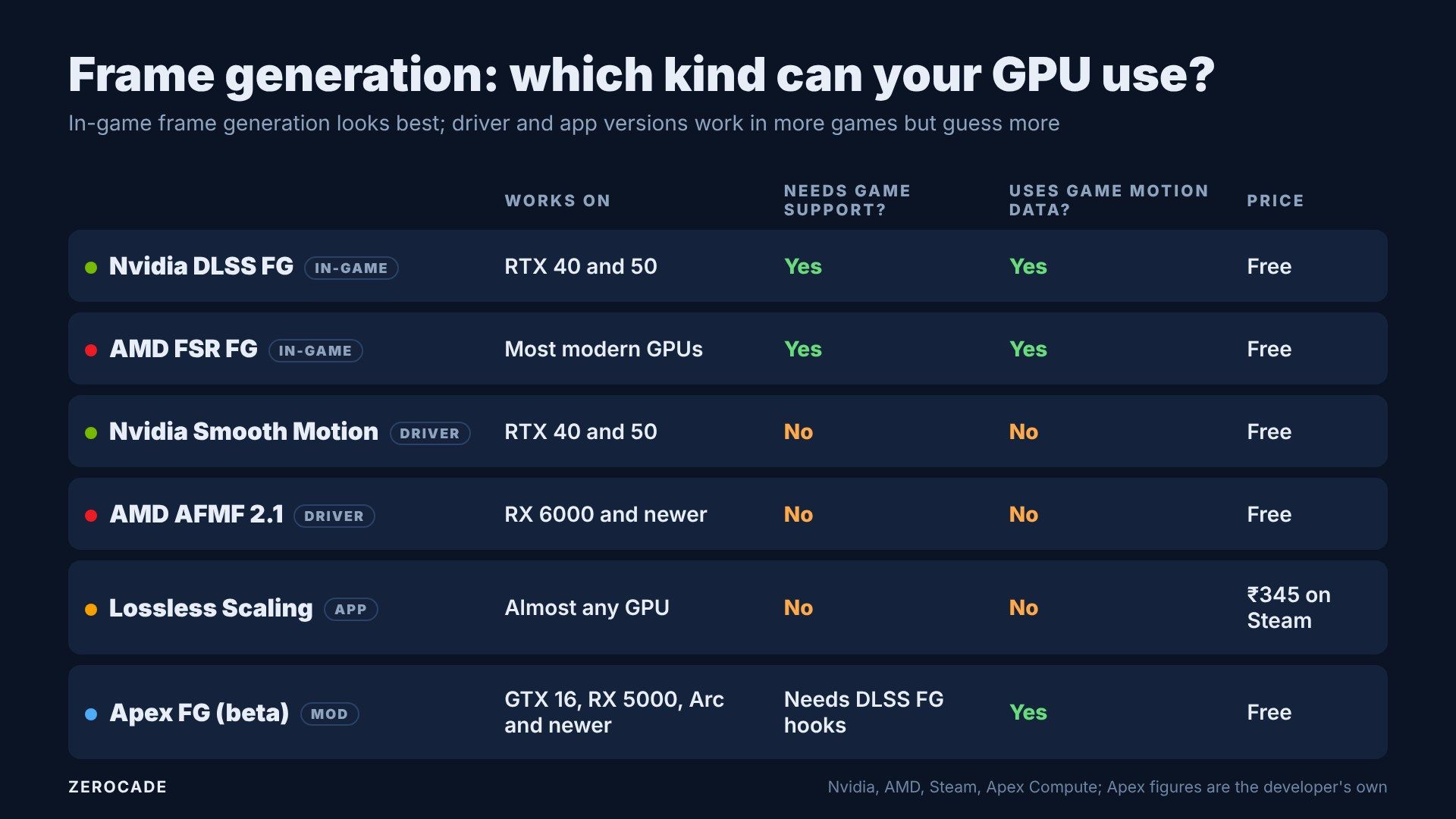
Image: Zerocade
1. Built into the game
This is the best version. When a game supports DLSS Frame Generation, FSR Frame Generation or Intel's XeSS-FG, the game hands the frame generator extra information: motion vectors (which way each pixel is moving), the depth buffer (how far away each pixel is) and where the HUD sits. With that, the generator can work out what the in-between frame should look like rather than guess.
- DLSS FG needs an RTX 40 card, and Multi Frame Generation needs an RTX 50.
- FSR FG works on most modern GPUs, including Nvidia's. AMD's newer machine-learning version is for RX 9000 cards.
- XeSS-FG dropped its Intel-only requirement in late 2025, and Intel recommends RTX 30 or RX 6000 and newer.
2. Built into the driver
When a game has no frame generation at all, AMD and Nvidia can add it at the driver level:
- AMD Fluid Motion Frames (AFMF 2.1) works in DX11, DX12, Vulkan and OpenGL games. RX 7000 and newer get the full feature set; RX 6000 works only in exclusive fullscreen. AMD claims up to about 2.5x the frame rate in its own testing.
- Nvidia Smooth Motion is switched on in the Nvidia app. It started on RTX 50 and reached RTX 40 in 2025.
The driver can't see the game's motion vectors or depth, only the finished images. So it has to estimate motion by comparing frames, which means more artefacts, especially around the HUD and fast-moving edges.

Image: AMD
3. An app: Lossless Scaling
Lossless Scaling is a ₹345 Steam app from a developer called THS. It captures what's on your screen and adds generated frames on top, using its own machine-learning model, LSFG 3. It works on almost any GPU and in almost any game that runs in windowed or borderless mode. It can even run the frame generation on a second graphics card.
It's hugely popular, with a "Very Positive" rating from around 17,000 English Steam reviews. Like driver-level tools, it only sees the final image, so expect more artefacts than in-game frame generation.
What OptiScaler does
Mods take a different route. The best known is OptiScaler, a free, open-source tool. It sits between a game and its upscaler: when the game calls DLSS, FSR or XeSS, OptiScaler intercepts the call and sends it to whichever one you pick in its own overlay.
That works because all modern upscalers need the same ingredients from the game: the low-resolution image, motion vectors, depth and camera jitter. So an AMD card can be fed through a game's DLSS code path into FSR, or an Nvidia card can use XeSS in a game that only offers FSR.
It installs by placing a DLL file, usually named dxgi.dll, next to the game's .exe, which Windows loads before its own version. It can also make a game think an Nvidia card is present so the DLSS options appear. Our guide on how mods add DLSS to games covers a real example.
The new one: Apex Neural Rendering
Apex Neural Rendering is the newest of these. Its frame generation went into public beta on November 12, from a company called Apex Compute. It plugs in through OptiScaler, hooking into the game's DLSS Frame Generation path, so it works in games that support DLSS FG, but on hardware Nvidia doesn't allow.
- GPUs: Nvidia GTX 16 and RTX 20 to 50, AMD RX 5000 to 9000 and Steam Deck, Intel Arc A and B series. There's also a separate Mac test kit for Apple silicon.
- Price: free. The code isn't open source yet.
- Claimed speed: on an RTX 5090 at 4K, 1.01 milliseconds to generate a frame versus 1.26ms for DLSS FG, and 214MB of video memory versus 562MB.
Those are Apex's own figures, with no independent testing yet. They measure how long it takes to make each generated frame, not your final frame rate, so they're roughly 25-35% faster, not the "2.4x" some headlines claimed. Apex hasn't published any input-lag figures.
Image: AMD
The risks
- Bans in online games. OptiScaler's own page warns: do not use it in online games, because anti-cheat may flag it. In 2023, even AMD's official Anti-Lag+ feature got Counter-Strike 2 players banned because it hooked game files the same way.
- Fake downloads. OptiScaler has no official website or "manager app". The only real sources are its GitHub page, Discord and NexusMods page. Fake versions are a common way to spread malware.
- Stability. Game updates can break mods, and overlays like MSI Afterburner can clash with them.
Which one should you try?
On paper, start with what's built in: use in-game frame generation if your game and card support it. If not, try your driver's option, AFMF or Smooth Motion, since it's free and needs no files changed. Lossless Scaling is the simplest choice for older cards. Leave mods like OptiScaler and Apex for single-player games, and keep an eye on independent tests of Apex before trusting its numbers.