
The short version
- Your graphics card is the biggest power draw in a gaming PC. Start from its official board power and the maker's recommended PSU: 650W for an RTX 5070, 750W for an RTX 5070 Ti or RX 9070 XT, 850W for an RTX 5080 and 1000W for an RTX 5090.
- Those recommendations already include the CPU and the rest of the PC, plus headroom. You don't add them on top.
- A PSU built to ATX 3.0 or 3.1 is designed to handle short power spikes from modern graphics cards, and 3.1 uses the newer 12V-2x6 connector.
- 80 Plus ratings are about efficiency, not quality or wattage. An 850W Gold unit costs roughly ₹9,000 to ₹12,000 in India right now.
Why this is in the news
SilverStone has just launched the HELA 1350Rz, a 1350W power supply that ships with three CPU power cables. It says the third one is there for the "high power demands" of Intel's next desktop chips, codenamed Nova Lake-S. Leaks have put the biggest Nova Lake chip's peak power as high as 474W, though Intel hasn't confirmed any figure. Our guide to Intel's chip codenames explains where Nova Lake fits.
Most people won't need a 1350W unit. But the question behind it, how much power a gaming PC really needs, comes up with every new build.
Step 1: start with the graphics card
The GPU is where most of a gaming PC's power goes, and both Nvidia and AMD publish two numbers for each card: how much power the card itself is rated to draw, and the size of PSU they recommend for a whole PC built around it.
| Graphics card | Board power | Recommended PSU |
|---|---|---|
| RTX 5070 | 250W | 650W |
| RTX 5070 Ti | 300W | 750W |
| AMD RX 9070 XT | 304W | 750W |
| RTX 5080 | 360W | 850W |
| RTX 5090 | 575W | 1000W |
Nvidia says its RTX 5090 figure assumes a PC with a Ryzen 9 9950X, a high-end CPU. Card makers' factory-overclocked versions sometimes draw more and list a higher recommendation, so check the page for the exact model you're buying.
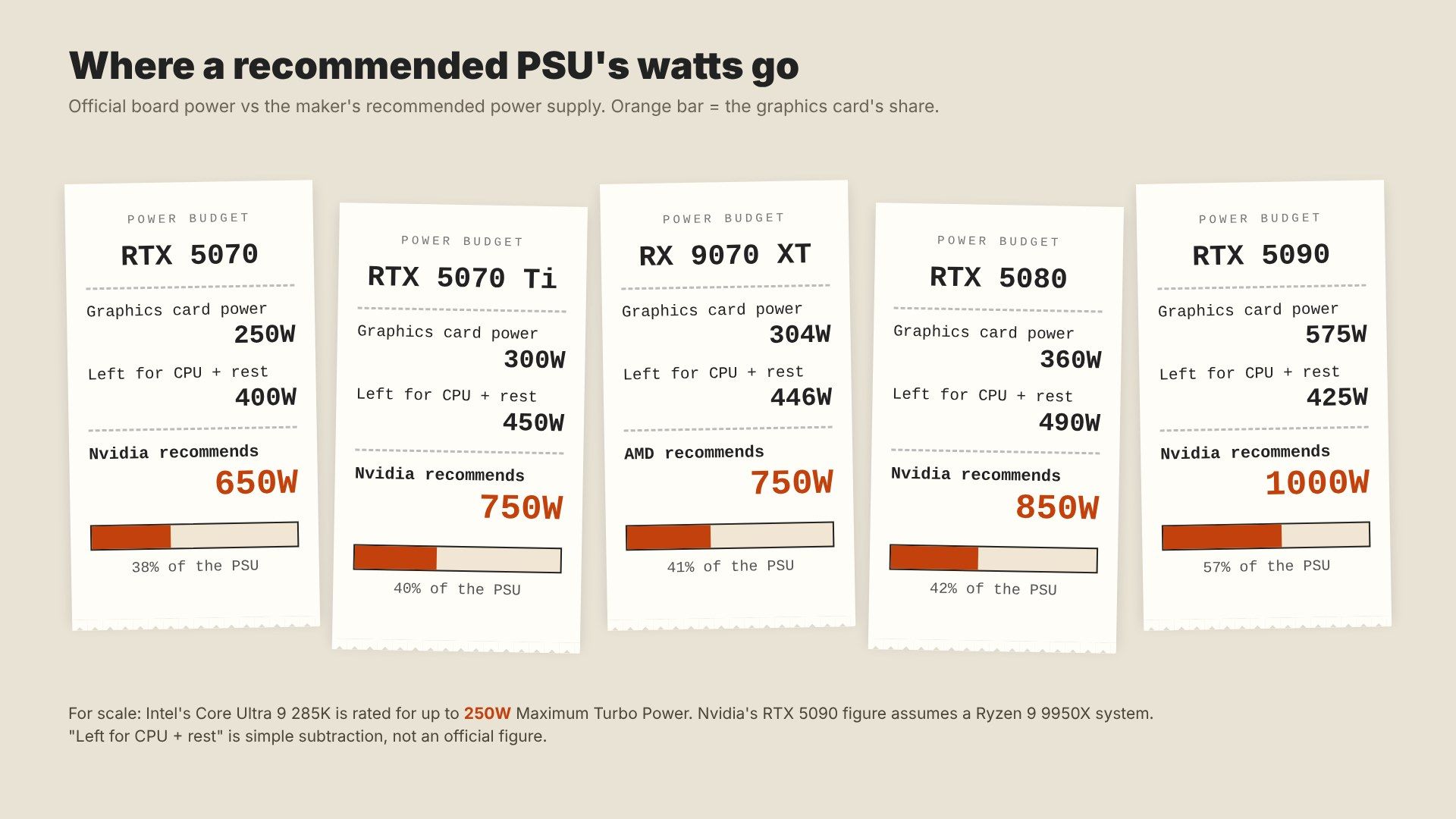 Image: Zerocade
That graphic shows something useful: the card takes only about 38% to 57% of the recommended PSU. The rest covers the CPU, the motherboard, drives, fans and lights, plus a safety margin.
Step 2: check the CPU
The CPU is the second-biggest draw, and it varies far more than people expect.
- Intel's Core Ultra 9 285K has a 125W base power and a 250W Maximum Turbo Power, its official limit for short bursts and heavy loads.
- AMD's Ryzen 9 9950X3D has a 170W TDP.
- Mid-range chips like a Ryzen 7 or Core Ultra 5 sit well below those.
In most games, the CPU runs nowhere near its maximum. The high figures matter for long rendering or compiling jobs, and for chips like Nova Lake if the rumoured numbers turn out to be true. When the GPU maker's recommendation assumes a top-end CPU, as Nvidia's 5090 figure does, you're already covered.
Step 3: leave headroom
Two reasons to aim above the bare minimum:
- Power spikes. Modern graphics cards can briefly draw well above their rated power for fractions of a second. Older PSUs sometimes shut off when that happened.
- Efficiency. Most power supplies run most efficiently around half load, so a PC that draws 400W while gaming sits comfortably on a 750W to 850W unit.
A reasonable rule: follow the GPU maker's recommendation, and go one step up (say 850W instead of 750W) if you plan to upgrade the graphics card later or use a power-hungry CPU. Going far beyond that mostly costs money.
What ATX 3.0 and 3.1 changed
ATX is Intel's standard for PC power supplies. Its two recent versions were written mainly for today's graphics cards:
- ATX 3.0 (2022): a PSU over 450W must handle short spikes of 200% of its rated power for 100 microseconds without shutting down. It also introduced the 16-pin 12VHPWR cable that can feed up to 600W to a graphics card through one plug.
- ATX 3.1 (2023): renamed that connector 12V-2x6 and changed its pins. The four small sense pins are 0.25mm shorter and the power pins 1.5mm longer, so the card only draws full power when the plug is pushed all the way in. It also set the required hold-up time, how long a PSU keeps running after a power cut, to 12ms, with 17ms at 80% load recommended.
Those connector changes came after reports of melting plugs. Nvidia said in November 2022 that it had about 50 reports of melted RTX 4090 connectors, mostly linked to plugs not being fully inserted. In February 2025, overclocker der8auer measured 22A on one wire of an RTX 5090's cable, more than twice its 9.5A rating, with the connector reaching about 150°C. Our explainer on why GPU power connectors melt goes through the causes and a safety checklist.
If you're buying a new PSU for an RTX 50-series card, look for ATX 3.1 and a native 12V-2x6 cable rather than an adapter.
What 80 Plus ratings mean
The 80 Plus badge is about efficiency: how much of the power drawn from the wall reaches your PC instead of turning into heat. It says nothing direct about build quality, protection or noise.
Required efficiency at 20%, 50% and 100% load, for 115V mains (the US standard):
| Rating | 20% load | 50% load | 100% load |
|---|---|---|---|
| Bronze | 82% | 85% | 82% |
| Gold | 87% | 90% | 87% |
| Platinum | 90% | 92% | 89% |
| Titanium | 92% | 94% | 90% |
Titanium also needs 90% at just 10% load. India runs on 230V, where power supplies are usually a little more efficient than these figures, but the 115V numbers are the ones most boxes quote. Some makers, including Corsair, now also use Cybenetics ratings, a newer test that measures efficiency across many more load levels and rates noise as well.
What does the difference cost? Take a PC drawing 400W for 4 hours of gaming a day. A Gold unit at 90% pulls about 444W from the wall, a Bronze unit at 85% about 471W. That's roughly 39kWh a year, or about ₹250 at an average household rate of around ₹6.47 per kWh (GlobalPetrolPrices' figure for India). By our calculation, that's real but small. Gold is worth it for less heat and a quieter fan at the same load, not to save on bills.
Why CPU cable count matters
The CPU gets its own power cables, separate from the graphics card's. According to Corsair, a single 8-pin EPS CPU cable can carry over 300W, and a 4-pin about 190W. For every desktop chip on sale today, one 8-pin is enough, and many boards add a 4-pin for extra margin.
That's why SilverStone's third cable stands out. Earlier leaks suggested some high-end motherboards for Nova Lake may have two or three CPU power connectors, with the third optional. If those chips really draw close to 474W at peak, two cables would already cover it on paper. A third gives the board more room, but it's a sign of where the top end is heading, not something mid-range builders will need.
What a good PSU costs in India
On November 22, these 850W Gold units were listed at Indian retailers:
| Model | Rating | Price |
|---|---|---|
| Corsair RM850x | 80 Plus Gold | ₹11,600 at MDComputers (MRP ₹19,999) |
| Corsair RM850x | 80 Plus Gold | ₹12,199 at PrimeABGB (out of stock) |
| MSI MAG A850GL PCIE5 | 80 Plus Gold | ₹9,320 at MDComputers |
| Deepcool PN850M | 80 Plus Gold | ₹8,866 at PrimeABGB |
SilverStone hasn't announced a price for the HELA 1350Rz, and it isn't listed in India yet.
On paper, a quality 850W Gold unit at about ₹9,000 to ₹12,000 covers everything up to an RTX 5080 with a high-end CPU, with room to spare. Going cheap on the PSU is a common mistake: it powers everything else, and a bad one can take other parts with it. Heat matters too, and our guide on thermal throttling explains why cooling the rest of the PC is just as important.
Quick checklist
- Find your graphics card's recommended PSU on the maker's spec page.
- Go one step up if you'll upgrade the GPU later or use a top-end CPU.
- Choose ATX 3.1 with a native 12V-2x6 cable for an RTX 50-series card.
- Look for 80 Plus Gold or better from a known brand, and check the warranty length.
- Make sure the PSU has enough CPU cables for your motherboard.
What to watch next
Watch Intel's CES keynote in January for Nova Lake's real power figures, and the motherboards launched alongside it. If high-end boards really ship with three CPU connectors, expect more power supplies like SilverStone's to follow.