
The short version
- Two mid-range GPUs, an RTX 5060 Ti on an Ant eSports 750W PSU and a Sapphire RX 9060 XT on a Corsair PSU, melted their 8-pin power connectors, reported on November 16. In both cases a poorly seated plug is the suspected cause.
- Connectors melt because of resistance. A loose, dirty or worn contact gets hot, and the heat makes the contact worse.
- The old 8-pin has roughly 2.4 times more capacity than its 150W rating. The 16-pin 12V-2x6 used on high-end cards has only about 1.14 times headroom over 600W.
- The fix is mostly physical: push the plug in fully, don't bend it near the card, and replace old cables. An ATX 3.1 PSU like the Corsair RM750e costs about ₹9,700 in India.
What happened this week
Wccftech reported both cases on November 16, from posts on Reddit.
- RTX 5060 Ti 16GB: the owner's screen went blank. When they pulled the card, both the card's socket and the cable's plug were badly burnt. The PSU was a 750W unit, likely from the Indian brand Ant eSports, and the card ran on a single 8-pin cable. A commenter said the plug hadn't been fully inserted, and the owner agrees that's the likely cause.
- Sapphire RX 9060 XT Pulse: the melting was mostly on the cable side. The PSU was a Corsair model, and the cable was about four years old. Again, a poor connection is the suspected cause.
These are cards drawing roughly 160 to 180W, well within what a single 8-pin can handle. That's what makes the cases unusual, and why the likely culprit is the connection rather than the card.

Image: AMD
How a graphics card gets its power
A desktop GPU draws power from two places: the PCIe slot on the motherboard, and one or more cables from the PSU.
| Source | Rated power | Live 12V pins |
|---|---|---|
| PCIe x16 slot | 75W | Through the slot |
| 6-pin PCIe | 75W | 2 or 3 |
| 8-pin PCIe (6+2) | 150W | 3 |
| 12VHPWR / 12V-2x6 (16-pin) | Up to 600W | 6, plus 4 sense pins |
Each live pin is a small metal terminal that grips a matching pin in the socket. Current flows through that grip, and how well it grips decides everything else.
Why connectors melt: resistance turns into heat
Every electrical contact has a tiny resistance. The heat it produces follows a simple rule: heat = current² × resistance. Double the current through one pin and you get four times the heat.
A good contact has very low resistance. A half-inserted plug, a terminal spread open by repeated use, dust or corrosion all raise it. That one contact gets warmer, the plastic around it softens, the grip loosens further, and resistance climbs again. It's a loop, and it ends with melted plastic.
There's a second problem when several wires share the load. If one pin makes a poor contact, its current shifts onto the others. Overclocker der8auer measured an RTX 5090 where two wires were carrying more than 20A each, against a rating of about 8A, reaching around 150°C at the PSU end in under five minutes. Cards like the RTX 4090 and 5090 join all their 12V pins together, so they can't tell when the load is lopsided. The older RTX 3090 Ti balanced its current across three separate channels.
Why 8-pin rarely fails, and 16-pin more often
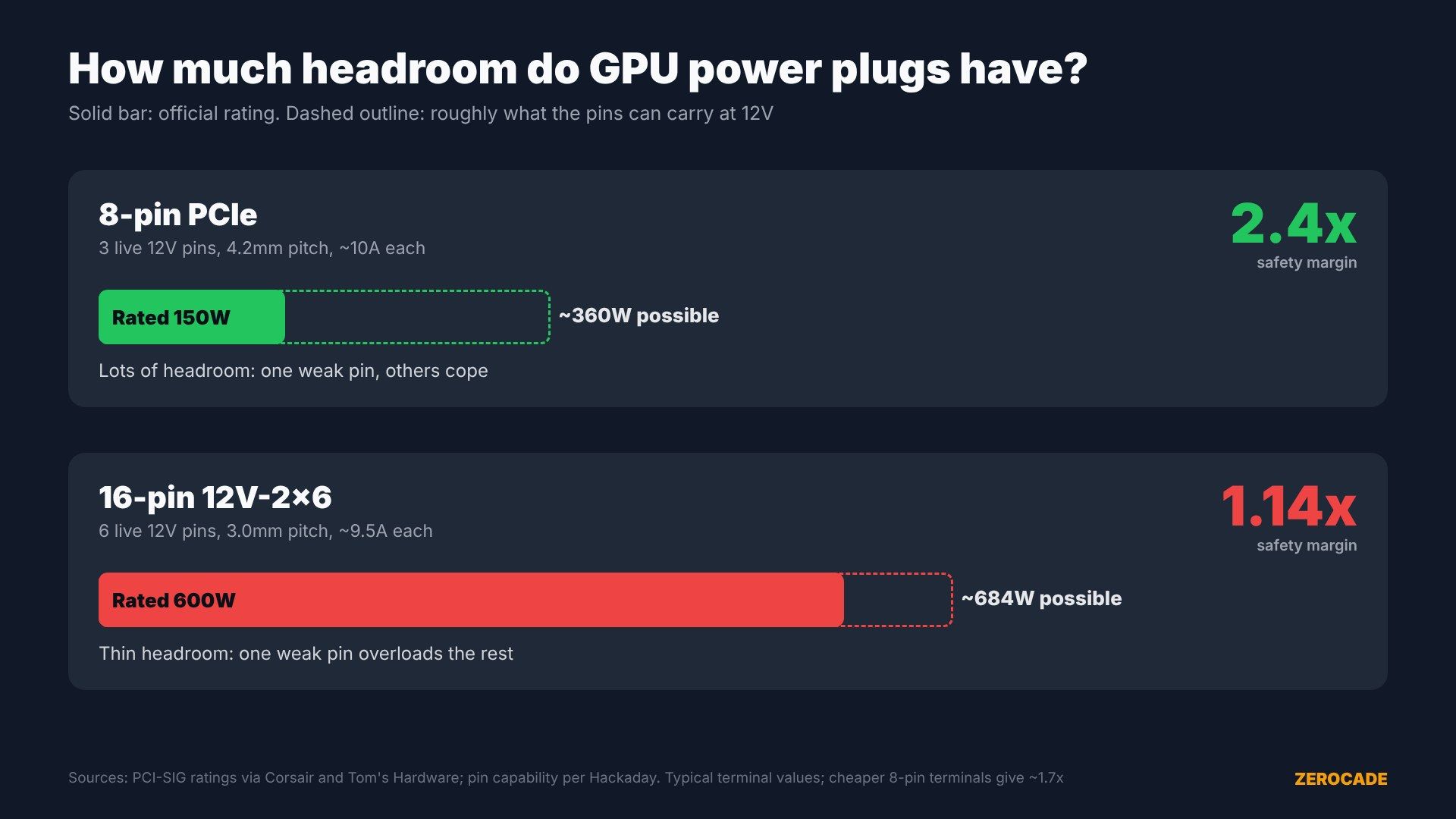
Image: Zerocade
The difference is headroom. An 8-pin's three 12V pins can each typically carry about 10A, which at 12V adds up to around 360W. It's rated for 150W, so there's about 2.4 times the capacity it officially needs, or about 1.7 times with cheaper terminals.
The 16-pin connector packs six 12V pins at a smaller 3mm pitch. At about 9.5A each, that's roughly 684W of capability for a 600W rating, only around 1.14 times headroom. A single bad pin on a 16-pin can push the rest past their limits. On an 8-pin, the others have room to absorb it.
That's why melting became a headline with the RTX 4090. In November 2022, Nvidia said it had about 50 reports worldwide and that the common cause was plugs not fully inserted. In 2024, CableMod recalled about 25,300 angled 16-pin adapters after 272 reports of loosening, overheating and melting.
What 12V-2x6 changed
The newer 12V-2x6 connector, defined by PCI-SIG in 2023, is a revision of 12VHPWR. Its four small sense pins tell the card how much power it may draw. Both grounded means 600W; neither connected means no power at all.
In 12V-2x6, those sense pins are shorter and recessed, so a plug that isn't fully pushed in should stop signalling power instead of running at full load through a partial contact. The cable side didn't change, so older 12VHPWR cables still fit. Corsair has gone a step further with a ThermalProtect cable, launched in April, which has a temperature sensor near the plug and shuts the GPU down if it overheats.
None of that applies to 8-pin plugs, which have no sense pins. A half-seated 8-pin will happily run.
Checklist: keep your connectors safe
- Push until it clicks. The latch should be fully engaged with no gap between plug and socket. Plug into the GPU first and firmly.
- Use your PSU's own cables. Never mix modular cables between PSU brands or even models, as the pin layouts at the PSU end can differ.
- Avoid cheap adapters and extensions, especially angled ones.
- Don't bend near the plug. Keep about 35mm of straight cable at the connector, bend before plugging in, and make sure the side panel doesn't press on it.
- Respect the 30-cycle rating. 8-pin and 12V-2x6 connectors are rated for about 30 plug-ins. A cable that's moved through several builds is worth replacing.
- Inspect when the card is out. Browning, a glossy melted look, or bent pins mean the cable and possibly the card need replacing. Never reuse a cable that has melted.
- Use separate cables for hungry cards. One pigtail cable for two 8-pin sockets is fine on a good PSU, but separate cables are safer on high-draw cards or unknown PSUs.
- Know the warning signs: a burning-plastic smell, sudden black screens or random shutdowns.
Safer power supplies in India
If you're building or upgrading, an ATX 3.1 PSU comes with a native 12V-2x6 cable and is designed for modern GPUs' power spikes.
| PSU | Price | Retailer |
|---|---|---|
| Corsair RM750e (ATX 3.1, Gold) | ₹9,700 | MDComputers |
| MSI MAG A750GL PCIE5 (ATX 3.1, Gold) | ₹8,449 | PrimeABGB |
For the cards involved, an Asus Dual RX 9060 XT 16GB is listed at ₹46,999 at MDComputers, while RTX 5060 Ti 16GB cards range widely, from about ₹81,000 upwards in stock.
What to watch
Watch for whether either owner gets a warranty replacement, and for more reports. Two cases in a day is unusual, but on paper the lesson is old: most melting comes down to the plug, not the card.