
Refresh Rate vs Response Time: What Actually Matters for Gaming
Gaming monitor boxes are covered in numbers: 165Hz, 1ms, FreeSync Premium, HDR400. Two of them get mixed up more than any others: refresh rate and response time. They sound alike, but they measure completely different things. One of them matters a lot more than the other, too.
Refresh Rate: How Often the Picture Updates
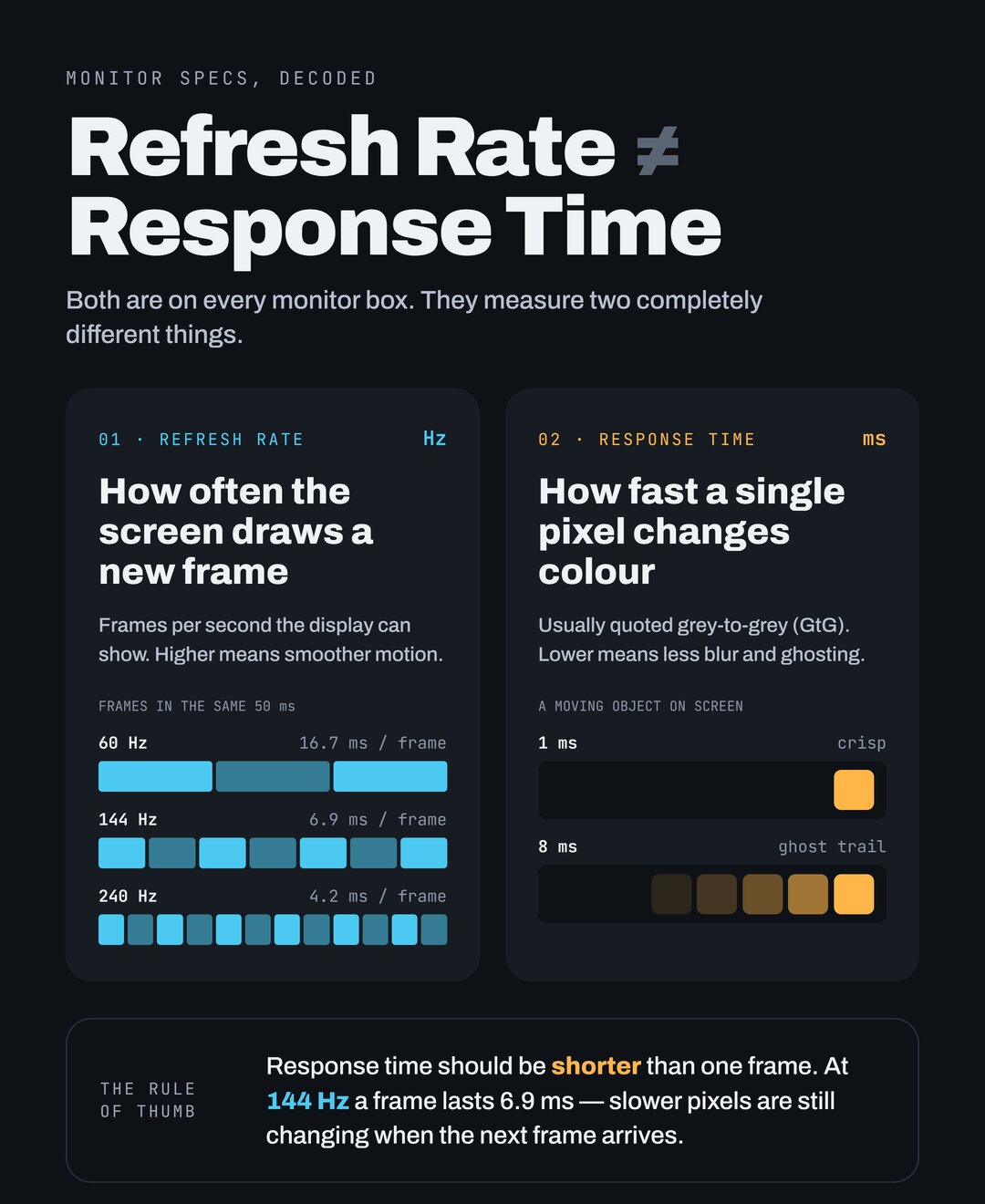
Refresh rate is the number of times per second the monitor draws a new image, measured in hertz (Hz). A 60Hz screen updates 60 times a second, and a 144Hz screen updates 144 times a second.
A higher refresh rate gives you:
- Smoother motion. Camera pans and fast movement look much more fluid.
- Faster feedback. A new frame arrives sooner after you move your mouse or stick, so the game feels more responsive.
- Easier tracking. Following a moving target is easier when it updates in smaller steps.
There's a catch: you only see the benefit if your PC or console actually renders that many frames per second. A 240Hz monitor showing a game running at 70fps looks about like a 70Hz monitor.
Quick fact: the PS5 and Xbox Series X|S max out at 120Hz, so a 144Hz or 165Hz monitor is plenty for console gaming. Anything faster only pays off on a capable PC.
Response Time: How Fast Pixels Change Color
Response time is how long a single pixel takes to change from one color to another, measured in milliseconds (ms). It's usually listed as "gray-to-gray" (GtG).
If pixels are too slow, moving objects leave a faint smear or trail behind them, called ghosting. Faster pixels mean a sharper image in motion.
Here's the important part: the number on the box is close to meaningless. Manufacturers measure response time in different ways, often at their most aggressive overdrive setting. Overdrive pushes pixels harder to speed them up, and when it's pushed too far it causes overshoot, bright or dark halos around moving objects. A "1ms" monitor can easily look worse in motion than a well-tuned "4ms" one.
If you're comparing monitors, independent reviews that test motion clarity tell you far more than the spec sheet.
Which Matters More?
For most players, refresh rate, by a wide margin. Going from 60Hz to 144Hz is one of the most noticeable upgrades you can make to a gaming setup. Response time only matters in the sense that the pixels need to keep up with the refresh rate. On a 144Hz screen a new frame arrives about every 7ms, so pixels that take much longer than that will blur.
A simple rule: pick the refresh rate your hardware can actually reach, then check reviews to make sure that monitor's motion handling holds up.
What About G-Sync and FreeSync?
These are variable refresh rate (VRR) technologies. Normally the monitor refreshes on a fixed schedule while the game delivers frames whenever they're ready. When the two fall out of step, you get screen tearing, where the top and bottom of the screen show different frames. The older fix, V-Sync, adds input lag and stutters when the frame rate dips.
VRR solves this by making the monitor wait for each new frame, so tearing disappears without the V-Sync penalty.
- AMD FreeSync is based on the open Adaptive-Sync standard and is common even on budget monitors.
- NVIDIA G-Sync comes in several tiers. Many "G-Sync Compatible" monitors are really Adaptive-Sync screens that NVIDIA has certified.
- HDMI 2.1 VRR is what the PS5 and Xbox Series X|S use on TVs and monitors.
Today most FreeSync monitors also work with NVIDIA cards, and vice versa, so VRR support matters more than which brand's logo is on the box.
Panel Types in One Line Each
- IPS: good colors and viewing angles, generally quick. A safe all-rounder.
- VA: deep contrast for dark scenes, but some models smear in dark transitions.
- TN: fast and cheap, but washed-out colors. Mostly a budget or esports pick now.
- OLED: near-instant pixel response and perfect blacks, at a higher price and with some burn-in risk for static elements like HUDs.
Frequently Asked Questions
Is 144Hz worth it over 60Hz? Yes. For most people it's the most noticeable monitor upgrade there is, as long as your hardware can run games above 60fps.
Is 1ms response time necessary? No. Real-world motion clarity depends on how well the monitor is tuned, not on the advertised number. Check reviews instead.
Do I need G-Sync if I have an NVIDIA card? Not a dedicated G-Sync module. Most FreeSync or Adaptive-Sync monitors work fine with NVIDIA cards in "G-Sync Compatible" mode.