

The short version
- TBW (terabytes written) is how much data a manufacturer rates an SSD to take before its warranty runs out. A Samsung 990 Pro 1TB is rated for 600TBW; a budget Crucial P3 Plus 1TB for 220TBW.
- Flash memory wears a little every time it's erased and rewritten, so every SSD has a limit. TBW is the maker's safe number for that limit, not the moment the drive dies.
- For gaming, the numbers are huge. Even a 220TBW drive would take about 12 years to hit its rating at a heavy 50GB of writes a day.
- You can check how much of a drive's rating is used with free tools like CrystalDiskInfo, Samsung Magician or WD Dashboard. The PS5's built-in SSD has no such tool.
Why this comes up now
Game installs keep growing. GTA 6 needs well over 200GB on consoles, and preloads open this week. Players who delete and reinstall big games to juggle space are writing a lot of data, and that's when the TBW line on the box starts to look worrying.
It shouldn't. But it helps to know what the number actually means.
What TBW and DWPD mean
TBW is a write-endurance rating, measured under a standard from JEDEC, the industry body that sets memory specs. It's the total amount of data you can write to the drive during its warranty. Samsung's 990 Pro datasheet, for example, says the 5-year warranty ends at five years or when the drive hits its TBW, whichever comes first.
DWPD (drive writes per day) says the same thing differently: how many times you could fill the whole drive every day for the warranty period. Divide TBW by capacity times the warranty days.
By Zerocade's maths, a 990 Pro 1TB at 600TBW over five years works out to about 0.33 DWPD. That's roughly 329GB written every single day for five years. Very few people come close.
Dell's own guidance on SSD life uses the simple version: divide TBW by your average daily writes, and that's your estimated lifespan in days.
Why flash memory wears out
An SSD stores data in NAND flash cells. A cell can't just be overwritten; it has to be erased first and then programmed with new data. Each erase-and-program round is called a P/E cycle, and every one wears the cell's insulating layer a little.
How many cycles a cell can take depends on how many bits it holds:
| Cell type | Bits per cell | Typical P/E cycles |
|---|---|---|
| SLC | 1 | about 50,000 to 100,000 |
| MLC | 2 | about 3,000 to 5,000 |
| TLC | 3 | about 1,000 to 3,000 |
| QLC | 4 | about 1,000 |
More bits per cell means cheaper, bigger drives, but fewer cycles. Most gaming SSDs today use TLC. Budget drives like the Crucial P3 Plus use QLC, which is why their TBW is lower.
 Image: Samsung
The tricks that stretch it
SSD controllers do a lot of quiet work to make those cycles go further:
- Wear levelling spreads writes across all the blocks, so no single area burns out first.
- Over-provisioning keeps spare flash hidden from you. When cells wear out, spares take their place. Drives commonly hold back around 7% or more, and part of that comes free from the gap between how drive makers count gigabytes and how your PC does.
- Write amplification is the catch. Moving data around internally means the flash often writes more than you asked it to. Intel measured about 1.1 on its old X25-M, meaning 10% extra. Spare area helps keep this low.
What popular drives are rated for
All of these carry a 5-year warranty.
| Drive | Flash | 1TB | 2TB | 4TB |
|---|---|---|---|---|
| Samsung 990 Pro | TLC | 600TBW | 1,200TBW | n/a |
| Samsung 990 EVO Plus | TLC | 600TBW | 1,200TBW | 2,400TBW |
| WD Black SN850X | TLC | 600TBW | 1,200TBW | 2,400TBW |
| Crucial T500 | TLC | 600TBW | 1,200TBW | n/a |
| Kingston NV3 | Not listed | 320TBW | 640TBW | 1,280TBW |
| Crucial P3 Plus | QLC | 220TBW | 440TBW | 880TBW |
Notice the pattern: double the capacity, double the TBW. More flash means more cells to share the wear. The 990 EVO Plus launched at $109.99 (about ₹9,700) for 1TB, and it carries the same 600TBW as the pricier 990 Pro.
Sony has never published a TBW for the PS5's internal 825GB SSD, and it's soldered to the board, so you can't swap it out. Notebookcheck estimated around 600TB by comparing it with a similar WD drive, but that's a guess, not Sony's figure.
How long that is for a gamer
Here's what those ratings mean at a heavy 50GB of writes every day, which is more than most players manage:
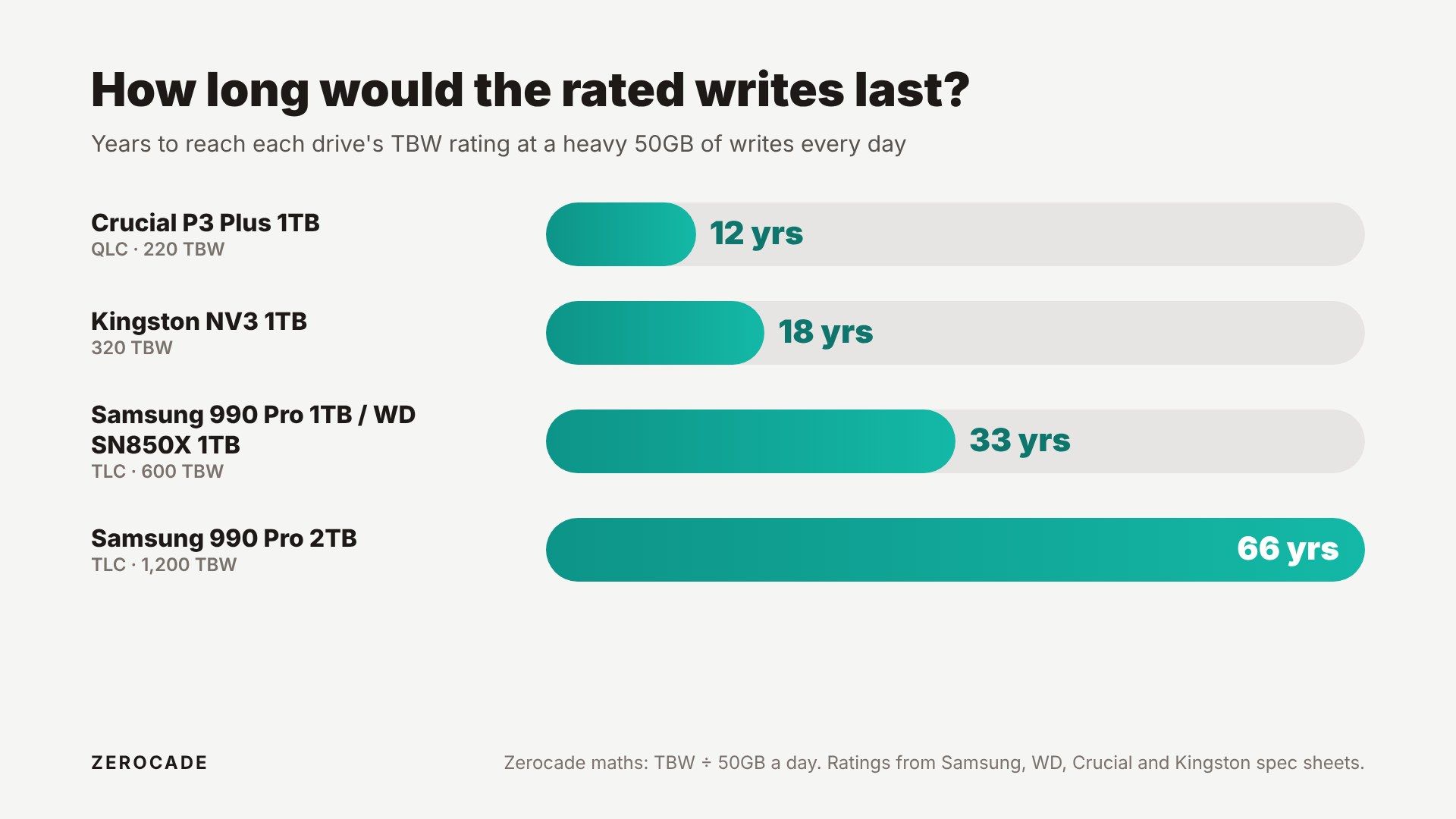 Image: Zerocade
Or think in game installs. A Kingston NV3 1TB at 320TBW could, on paper, take about 1,500 full installs of a 200GB-plus game like GTA 6. That's one fresh install every day for about four years.
SSD makers have historically assumed users write about 20 to 40GB a day. Downloading a big patch or a new game pushes you above that for a day, but most days you write far less.
What happens when a drive hits its limit
Hitting the TBW rating doesn't flip a switch. The warranty ends, but the flash usually has plenty of life left.
The best-known test came from The Tech Report, which spent about 18 months (2013 to 2015) writing nonstop to six consumer SSDs of around 250GB each. The Intel 335 shut itself down at about 750TB once its wear indicator ran out. A Kingston HyperX 3K died at 728TB. The Samsung 840 Pro was the last one standing, past 2.4 petabytes.
How a drive fails matters too. Intel's 600p, for example, locks into read-only mode when its spare area runs out, so you can still copy your files off it. Not every drive is that polite. In The Tech Report's test, all six eventually stopped working, and two died without any warning.
The lesson is the usual one: keep backups of anything you care about, no matter what the TBW says.
How to check your SSD's health
On a PC, these free tools read the drive's built-in SMART data:
- CrystalDiskInfo works with any brand. It shows a health percentage and Total Host Writes.
- Samsung Magician for Samsung drives.
- WD Dashboard for WD and SanDisk drives.
Three readings are worth knowing:
- Data Units Written is your running total. On NVMe drives, each unit is 512,000 bytes, so the tools convert it to TB for you. Compare it with your drive's TBW.
- Percentage Used is the maker's estimate of how much rated endurance is gone. It can climb past 100%, and 100% doesn't mean the drive has failed.
- Available Spare is the backup flash left. If this starts dropping early, that's the real warning sign.
On a PS5, there's no way to see this for the built-in SSD. If you've added an M.2 expansion drive, you can pull it and check it on a PC.
Should you worry?
For gaming, almost certainly not. Reinstalling big games, even often, barely dents a modern TLC drive's rating. If you're choosing a new SSD, a higher TBW is a decent sign of better flash, and buying the bigger capacity helps both your storage and your endurance.
Install CrystalDiskInfo or your drive maker's app once, note the Total Host Writes, and look again in six months. That one number will tell you how far you are from the limit.