

The short version
- A VBIOS (video BIOS) is your graphics card's own firmware. It lives on a small flash chip on the card and runs before Windows loads.
- It holds the card's basic settings: clocks, voltages, power limit, fan behaviour and memory details. It's also what puts an image on screen while your PC boots.
- Makers update it to add features, fix bugs or close security holes. If an update goes wrong, the card can stop working entirely, which is called bricking.
- Cards with a dual BIOS switch keep a second copy, which makes a bad flash much easier to recover from.
Why this came up
AMD asked owners of Radeon RX 7000 cards in October to install firmware updates from their card makers, to fix security problems it hasn't described publicly yet. AMD said there were no reports of the flaws being exploited.
ASRock posted its update, called ASRVBFlash 1.0.5, on October 29 for 10 cards, from the RX 7600 XT up to the RX 7900 XTX Taichi. Within days, some owners of RX 7900 XT and XTX cards reported that their PC wouldn't start with the card installed after the update. Pull the card out, and the PC booted fine.
ASRock replaced it with version 1.0.6 on November 10. It hasn't explained what went wrong or confirmed that the new version fixes it. That's a good moment to explain what this firmware actually does.

Image: ASRock
What a VBIOS is
Every graphics card has a small flash memory chip on its circuit board, usually a few megabytes in size. AMD's reference RX 7900 XTX firmware, for example, is a 2MB file. That chip holds the VBIOS.
When you turn your PC on, the motherboard's own firmware (its BIOS or UEFI) finds the graphics card and runs the code on that chip. That's how you see the boot logo and BIOS menus before any graphics driver exists. The idea goes back to 1984, when IBM's EGA graphics card shipped with its own video BIOS.
A modern VBIOS is really several pieces packed together:
- A legacy boot image. The old-style code that older PCs use to show a picture.
- A UEFI GOP driver. GOP stands for Graphics Output Protocol. It's what modern UEFI PCs use to show the screen at boot.
- Settings tables. Clock speeds, voltages, the power limit, the fan curve and memory timings. The RX 7900 XTX's reference firmware, for instance, lists a 291W power limit and two supported memory chip makers.
- Security firmware. On Nvidia cards, signed code that runs on the GPU's own small controllers before the driver loads.
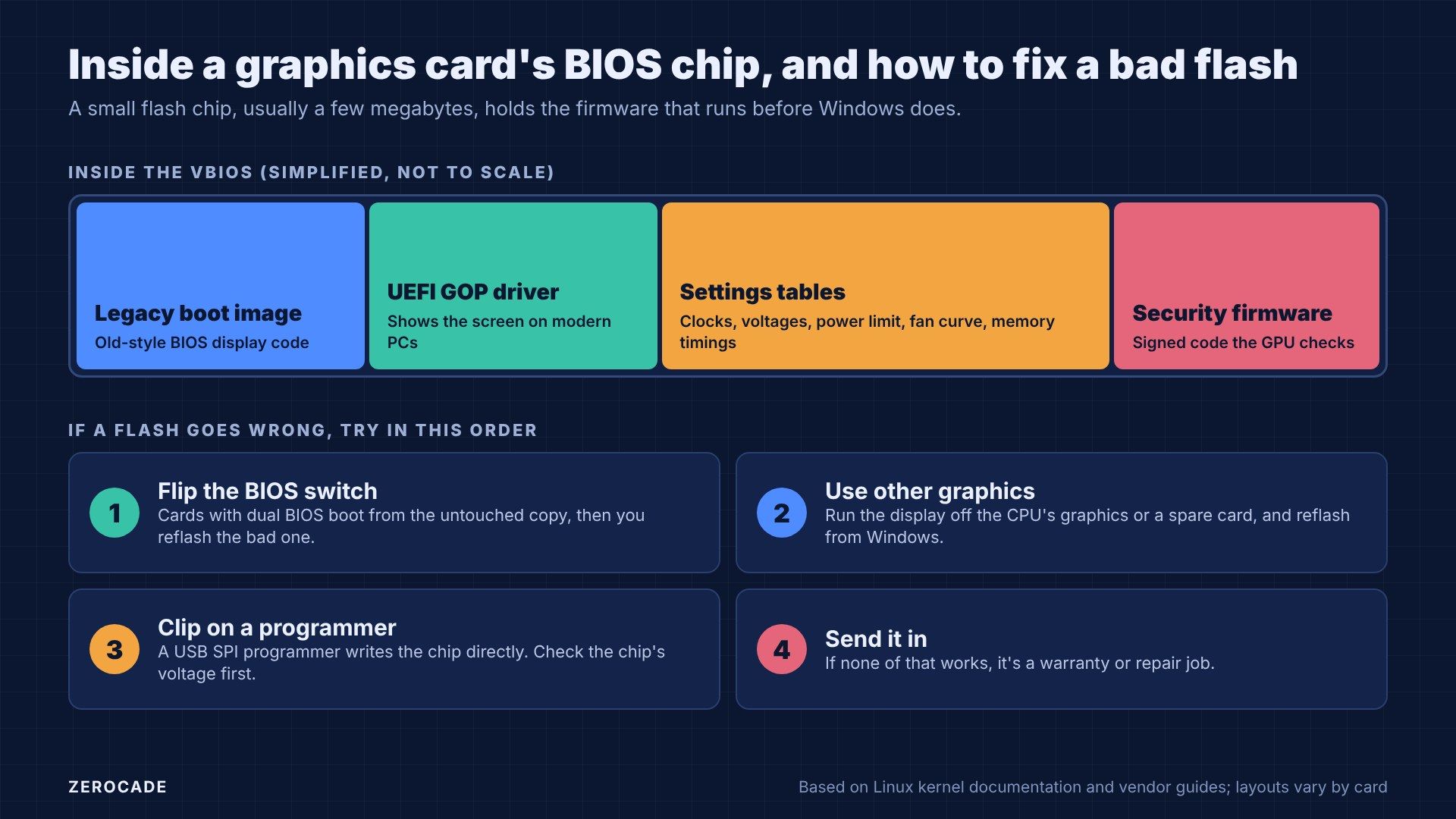
Image: Zerocade
VBIOS vs driver vs motherboard BIOS
These three get mixed up a lot:
| Where it lives | When it runs | How you update it | |
|---|---|---|---|
| VBIOS | Flash chip on the graphics card | From power-on, before Windows | Flashing tool from the card maker |
| Graphics driver | Your Windows or Linux install | Once the OS has loaded | Installer from AMD, Nvidia or Intel |
| Motherboard BIOS | Flash chip on the motherboard | From power-on, for the whole PC | Flashing tool from the board maker |
Most fixes for games come through drivers, which is why you update those every few weeks and almost never touch the VBIOS. A driver problem, like the Radeon SSD-writes bug AMD confirmed this week, can be rolled back. A firmware problem is harder to undo, because it can stop the card starting at all.
Why card makers release updates
VBIOS updates are rare, and they usually fix something specific:
- New features. In March 2021, Nvidia's RTX 3060 Ti, 3070, 3080 and 3090 needed a firmware update to support Resizable BAR, which Nvidia said gave gains of a few per cent, and up to 12%, in supported games.
- Boot problems. In May 2025, Nvidia released a firmware tool for RTX 50 cards that showed a blank screen when restarting on some older motherboards. Nvidia said to use it only if you had that problem.
- Security fixes. The current RX 7000 updates are this kind.
- Tuning. Some makers ship firmware with new clock or fan settings. ASRock did this for its RX 7900 XTX AQUA OC in 2023.
Why flashing can brick a card
Flashing means erasing the chip and writing new firmware to it. If that's interrupted, or the new file is wrong for your card, the chip can be left with firmware that won't start. Common causes include:
- The wrong file. Firmware is made for an exact card model, board revision and memory chip maker. AMD's flasher checks an ID on the card and refuses a file made for another board.
- Interruptions. A power cut, a crash or a forced restart mid-flash.
- Software getting in the way. ASRock's own instructions require removing the graphics driver with AMD's cleanup tool, going offline, and not touching the PC until the update says "PASS".
- A bad update. Occasionally the update itself is the problem, which is what owners suspect with ASRock's 1.0.5.
Both AMD and Nvidia now require firmware signed by the card maker, so you can't easily load modified or mismatched firmware. That protects against tampering, but it also means the card maker's official file is usually your only option.
How dual BIOS saves you
Many higher-end cards carry two firmware chips and a small switch to choose between them. They're usually sold as performance and quiet modes:
- ASUS ROG Astral cards have a Dual BIOS switch on the back. Quiet mode keeps the same power target with a gentler fan curve.
- Sapphire's Nitro+ RX 7900 XTX has a three-way switch: a 420W primary BIOS, a 350W secondary one, and a setting that lets Sapphire's software switch between them.
- ASRock's RX 7900 XTX Taichi has Performance and Quiet BIOS modes.
The second chip is the safety net. If one copy goes bad, you flip the switch, boot from the good one, then flip it back once Windows is running and reflash the broken copy.

Image: ASUS
How people recover a bricked card
If there's no second BIOS, these are the usual options, from easiest to hardest:
- Use other graphics. Plug your monitor into the motherboard, if your CPU has built-in graphics, or use a spare card. Then reflash the dead card from Windows.
- Use a programmer. A cheap USB SPI programmer, like the CH341A, clips onto the flash chip and writes it directly. Some RX 7900 XTX owners revived their cards this way. It's easy to damage the chip, though: some chips run at 1.8V and need an adapter, and you need the exact right firmware file.
- Warranty or repair. ASRock hasn't published a policy for cards bricked by its update. Owners report mixed answers, and at least one support reply said removing the cooler voids the warranty.
In India, warranty claims go through the card maker's local service partner or the shop you bought it from, so keep your invoice handy. Shipping a card out for repair can take weeks, which is one more reason not to rush an update.
Should you update your VBIOS?
On paper, the safest rules are simple:
- Only update when there's a reason. A security fix your card maker recommends, or a specific problem the update fixes.
- Use only your card maker's tool, for your exact model.
- Back up first. GPU-Z can save a copy of your current firmware.
- Don't interrupt it, and follow every step in the maker's instructions, including removing drivers if it asks.
- Wait a few days after a new release if you can, to see whether other owners report problems.
What to watch
If you own an ASRock RX 7000 card, check ASRock's support page for your exact model before updating, and watch for owners confirming that 1.0.6 works. AMD will also publish its security bulletin, AMD-SN-6023, at some point, which should explain what these updates actually fix.