

The short version
- Memory training is the calibration your motherboard runs on the RAM before anything appears on screen. It tunes the timing and voltage of every data line so DDR5 can run at 6000MT/s and beyond without errors.
- On a new build, a BIOS update or after turning on EXPO or XMP, it can take from about a minute to 5-15 minutes with a black screen. Plenty of builders think the PC is dead and pull the plug, which starts it all over again.
- AMD's new AGESA 1.3.0.1f Patch A makes AM5 debug displays count up during training instead of freezing on one code. So far it's in beta BIOSes for ASUS X870 and X870E boards.
- Memory is expensive right now: an in-stock 32GB DDR5-6000 CL30 kit costs roughly ₹66,000 to ₹75,000 at Indian retailers this week.
What changed this week
On AM5 motherboards with a two-digit debug display, memory training used to show one code and sit there. ASUS boards show code 15 with the yellow DRAM light, sometimes "for an age", as PC Gamer put it. Nothing on the monitor, fans spinning, and no sign anything is happening.
With AGESA ComboAM5 PI 1.3.0.1f Patch A, the display now ticks through codes while training runs. Wccftech and PC Gamer describe slightly different sequences, counting up from 00 and moving on, but both agree it's a moving counter rather than a percentage. PC Gamer's test system, a Ryzen 9 9950X with 64GB of DDR5-6000 on an ROG Crosshair X870E Hero, reached code 11 and then booted.
The training itself hasn't changed, only how visible it is. The new BIOSes are betas, and PC Gamer suggests waiting for a stable release if your PC already works fine.

Image: ASUS
Why RAM needs training at all
Your CPU's memory controller talks to the RAM over dozens of tiny wires, sending data billions of times a second. At DDR5-6000, a new bit goes down each line about every 0.17 nanoseconds.
The problem is that the signals don't all arrive at the same moment. On a memory stick, the clock and command lines run past each memory chip in turn (called "fly-by" routing), so the far chip hears everything slightly later than the near one. Each data line also has its own tiny differences in length and electrical behaviour. Every board, stick and CPU is a little different, so these delays can't be fixed at the factory. The controller has to measure them on your hardware and compensate.
How training works, step by step
- Command and Vref training. The controller sets each chip's reference voltage, the line between reading a 1 and a 0, then sends commands and checks what the chips echo back.
- Write leveling. The controller shifts the timing of its data strobe, the signal that says "data is valid now", one small step at a time until it lines up with the clock at each chip.
- Read and write training. The controller writes known test patterns, reads them back and adjusts each data line's delay and voltage until it sits in the middle of the "data eye", the window where the signal is clean.
- Save the results. The board stores the values so later boots can reuse them.
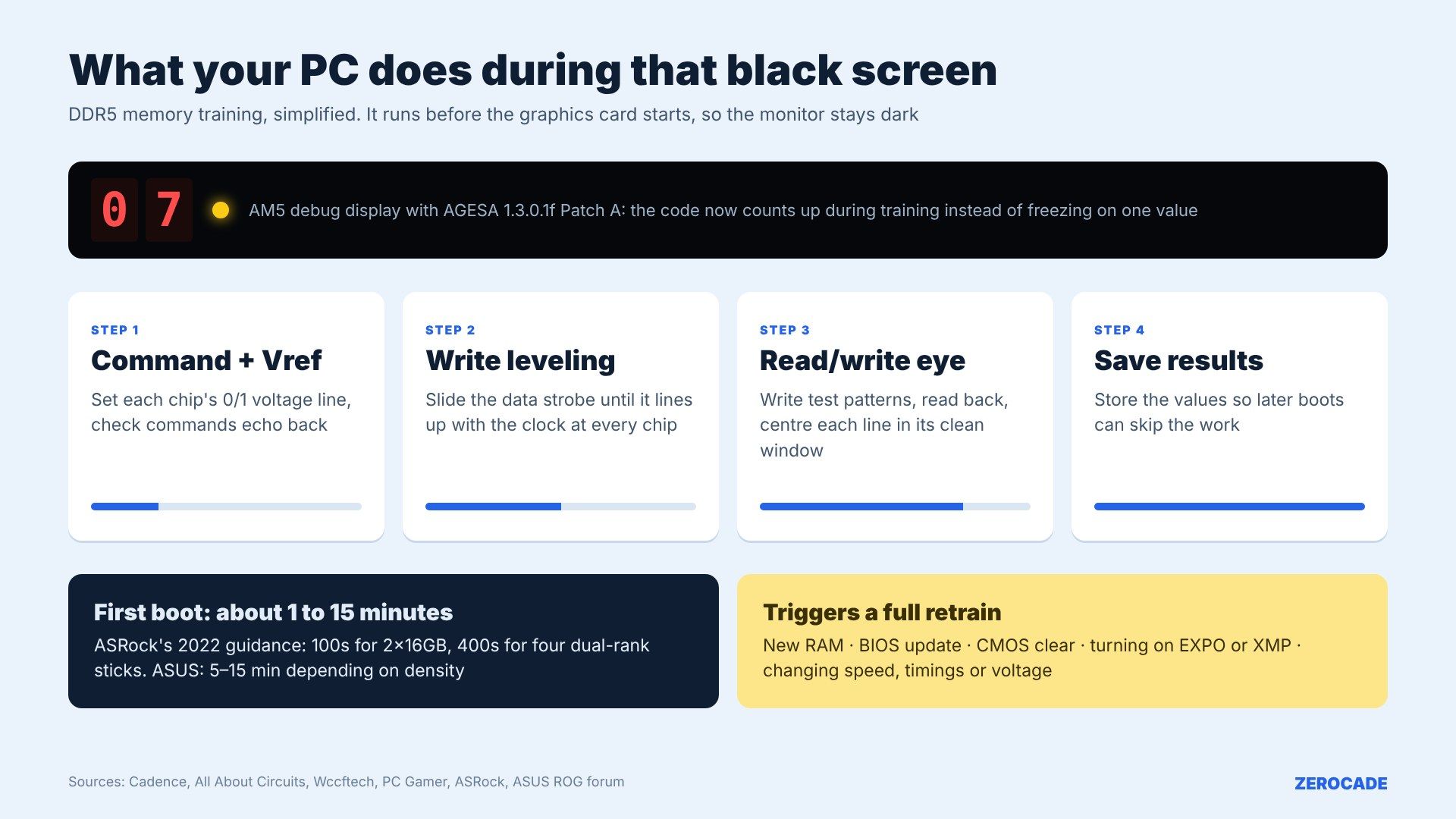
Image: Zerocade
Why DDR5 takes so much longer than DDR4
DDR4 topped out at 3200MT/s officially. DDR5 starts at 4800 and gaming kits run 6000 or higher, so the timing margin is far tighter. To cope, DDR5 added more things to calibrate:
- Two independent 32-bit channels per stick instead of one 64-bit channel, so more lanes to train.
- New training modes for chip select, command/address and read preamble, plus internal reference voltages for the command lines.
- Equalisers in the data receivers (DFE), which also need tuning.
DDR5 sticks also carry their own power chip (PMIC) and on-die ECC. On-die ECC only fixes errors inside the memory chip, though, not on the wires to the CPU, so the bus still has to be trained properly. More memory takes longer too: ASRock's 2022 X670E guidance listed 100 seconds for 2x16GB, 200 seconds for 2x32GB and 400 seconds for four dual-rank sticks, though BIOS updates have since cut those times. Our DDR4 vs DDR5 guide covers the wider differences.
What triggers a full retrain
Saved training values only work for the exact setup they were measured on. A full retrain runs when you:
- build a new PC or add or swap RAM;
- update the BIOS or clear CMOS;
- turn on EXPO (AMD) or XMP (Intel), or change memory speed, timings or voltage.
That last one catches lots of people. You enable EXPO to get your kit's rated 6000MT/s, save and reboot, and the screen stays black for minutes. ASUS's ROG forum says training can take 5 to 15 minutes depending on how much memory you have, and advises not interrupting it. If you cut power, it starts again.
Memory Context Restore: faster boots, with a catch
Memory Context Restore (MCR) tells an AM5 board to reuse the saved results on every later boot instead of re-checking. MSI's 2023 test on a Ryzen 7 7800X3D with 2x16GB DDR5-6000 cut time to the Windows desktop from 43 seconds to 22. Some users report much bigger drops, from minutes to under 20 seconds.
The catch: on marginal overclocks, or with the related Power Down setting disabled, some users report crashes or instability after sleep. MCR also doesn't help the first boot, because there's nothing saved yet. Some boards also have a separate DDR Training Runtime Reduction option.
Intel boards do the same job through Intel's memory reference code, saving results after the first boot. Dell tells customers a long first boot of one to four minutes after a memory change is normal. No Intel equivalent of AMD's new progress counter has been reported.
Image: AMD
What to do on your next build
- After the first power-on, or after enabling EXPO or XMP, wait at least 10 to 15 minutes before assuming anything is wrong. The PC may restart once or twice.
- Watch the debug LEDs or code display if your board has one. A DRAM light that stays on with a changing code means training is running.
- Once it boots, turn on Memory Context Restore if your board has it and your memory is stable.
Prices make patience worth it. A 32GB (2x16GB) DDR5-6000 CL30 kit was ₹66,269 for an Acer Predator Pallas II at PrimeABGB and ₹74,499 for a Corsair Vengeance at Computech Store on November 17, both in stock. Our VBIOS guide covers the graphics card's side of firmware.
What to watch
Watch for the progress display to reach stable BIOSes, and for MSI, Gigabyte and ASRock to add it to their AM5 boards. It doesn't make training faster, but it should save a lot of perfectly healthy PCs from being returned as dead.