
The short version
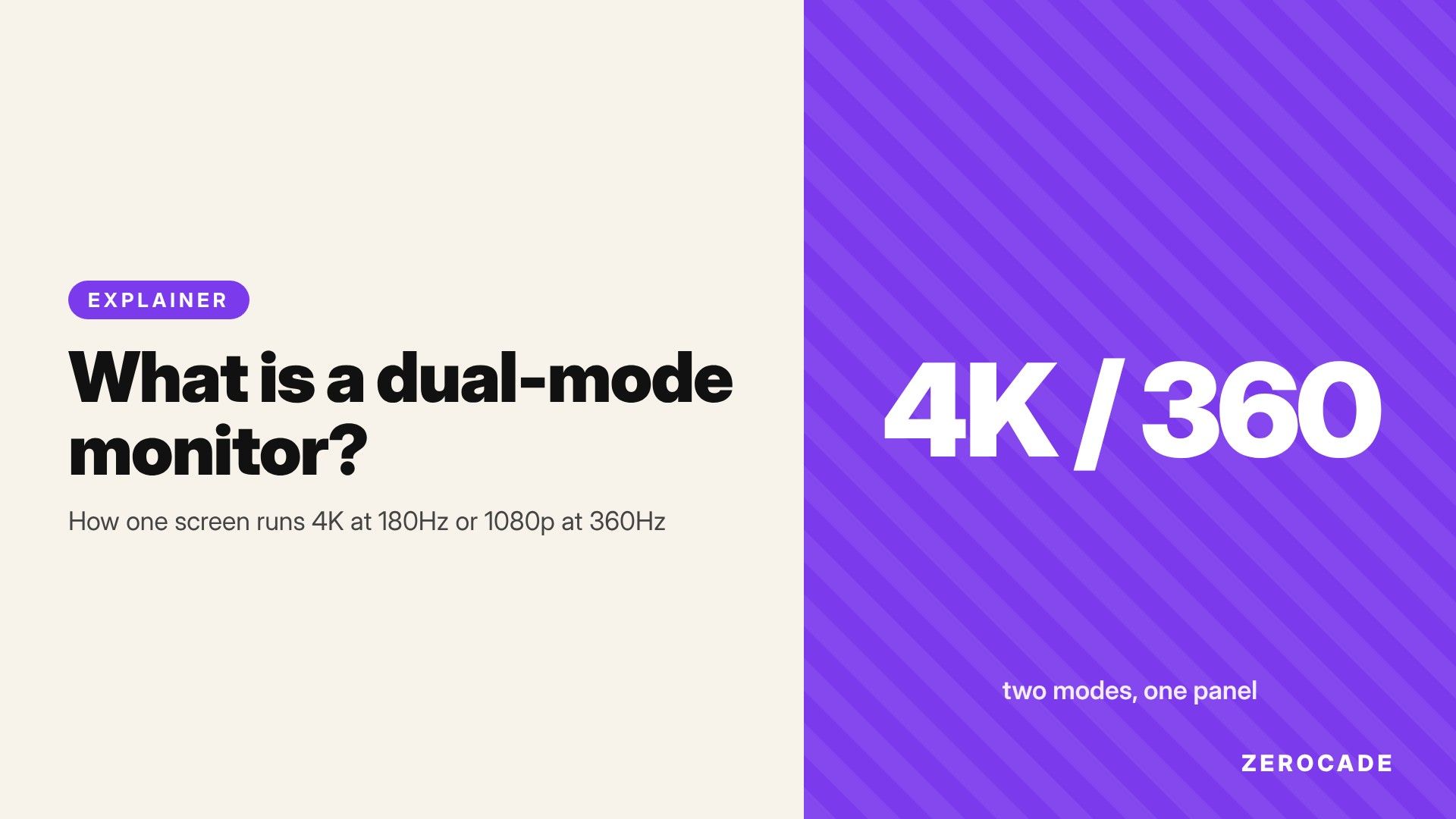
- A dual-mode monitor can switch between two settings: a high resolution at a normal high refresh rate, or a lower resolution at a much higher refresh rate.
- Lenovo's Legion 27U-20, a 27-inch IPS monitor, does 4K at 180Hz or 1080p at 360Hz. Notebookcheck reports a $499 (about ₹47,000) US price and availability from January 2027. No India price has been announced.
- The trick works because 1080p is exactly a quarter of 4K, so each 1080p pixel fills a neat 2x2 block of real pixels, and the screen has far less data to update each time.
- The catch: in the fast mode you're looking at a 1080p image on a 27-inch screen, which looks noticeably softer.
Why this matters now
On October 30, 2026, Notebookcheck reported that Lenovo is taking the Legion 27U-20 to more regions, with its spec database reportedly mentioning Asia Pacific and South Asia. Lenovo first showed it in August. Its spec sheet, as reported:
- 27-inch IPS panel, 3840 x 2160 (4K)
- 180Hz at 4K, or 360Hz at 1080p in dual mode
- 400 nits peak brightness, 1000:1 contrast, factory calibrated
- One DisplayPort 1.4, two HDMI ports, and USB-C and USB-A ports for accessories
Dual mode used to be a premium feature. LG's UltraGear 32GS95UE, a 32-inch OLED, popularised it in 2024 with 4K at 240Hz or 1080p at 480Hz. Now it's showing up on far cheaper IPS monitors, which is why it's worth understanding.
First, what refresh rate means
A monitor's refresh rate is how many times per second it draws a new picture. 60Hz means 60 times a second. At 360Hz, a new image arrives every 2.8 milliseconds. Higher numbers mean smoother motion and less delay, which is why esports players chase them. Our refresh rate vs response time guide covers the basics.
The problem is that every refresh means sending and drawing every pixel again. And 4K has a lot of pixels.
Why you can't just have 4K at 360Hz
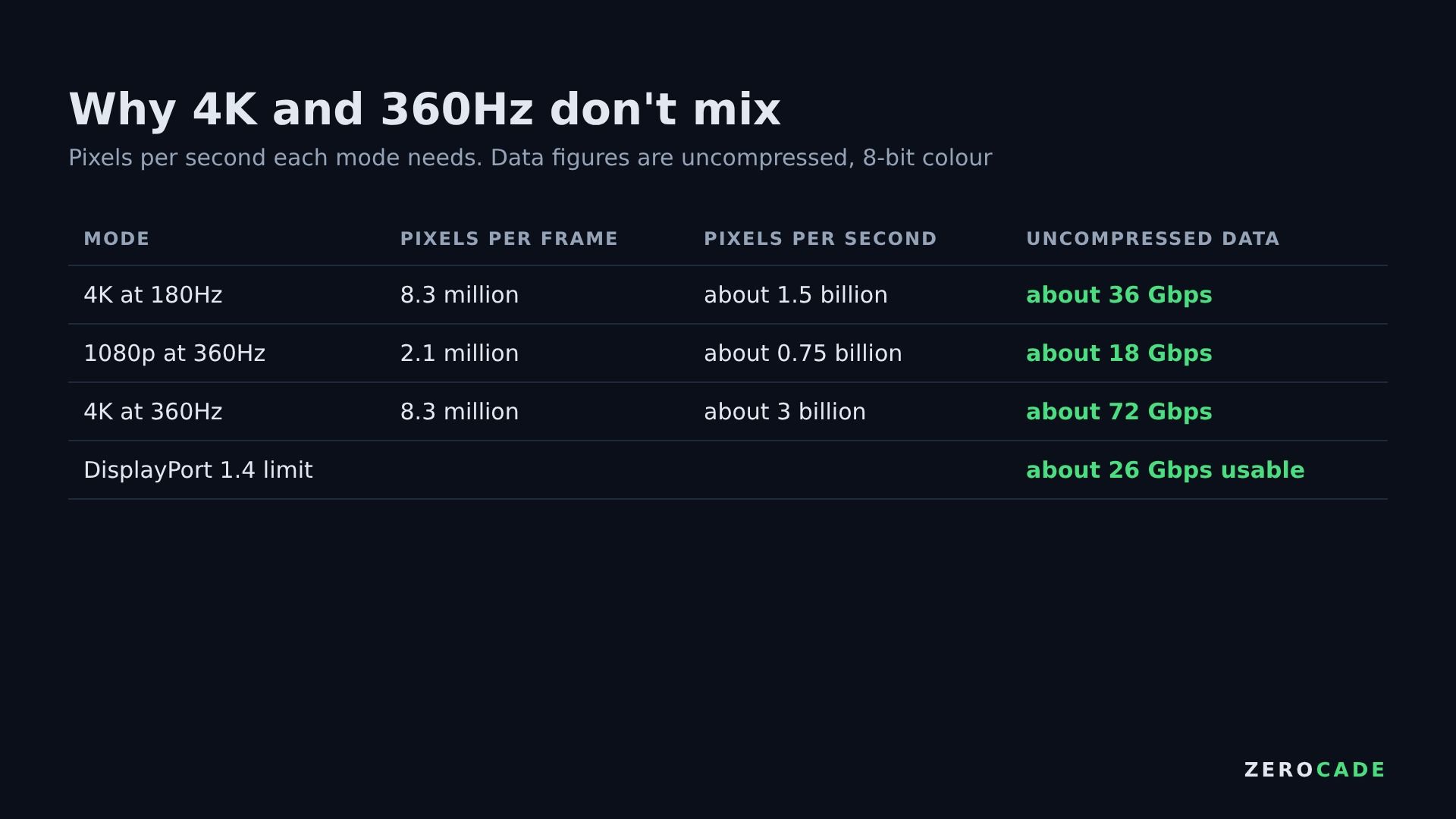
Image: Zerocade
A 4K screen has about 8.3 million pixels. A 1080p screen has about 2.1 million, exactly a quarter. Multiply by the refresh rate and you get how many pixels per second the cable and the panel have to handle:
- 4K at 180Hz: about 1.5 billion pixels a second.
- 1080p at 360Hz: about 0.75 billion pixels a second, half as many, despite double the refresh rate.
- 4K at 360Hz would need about 3 billion, double the 4K 180Hz load.
Two things get in the way. The first is the cable. DisplayPort 1.4, the port the 27U-20 uses, carries about 26 Gbps of usable data. Uncompressed 4K at 180Hz in 8-bit colour already needs about 36 Gbps, so the monitor relies on DSC (Display Stream Compression), a visually lossless compression standard, just to reach 180Hz. 4K at 360Hz would need far more.
The second is the panel itself. An LCD or OLED updates its pixels row by row, from top to bottom. There's only so fast each of 2,160 rows can be updated. Halving the number of rows the panel has to scan is the easiest way to roughly double the speed.
How dual mode actually works
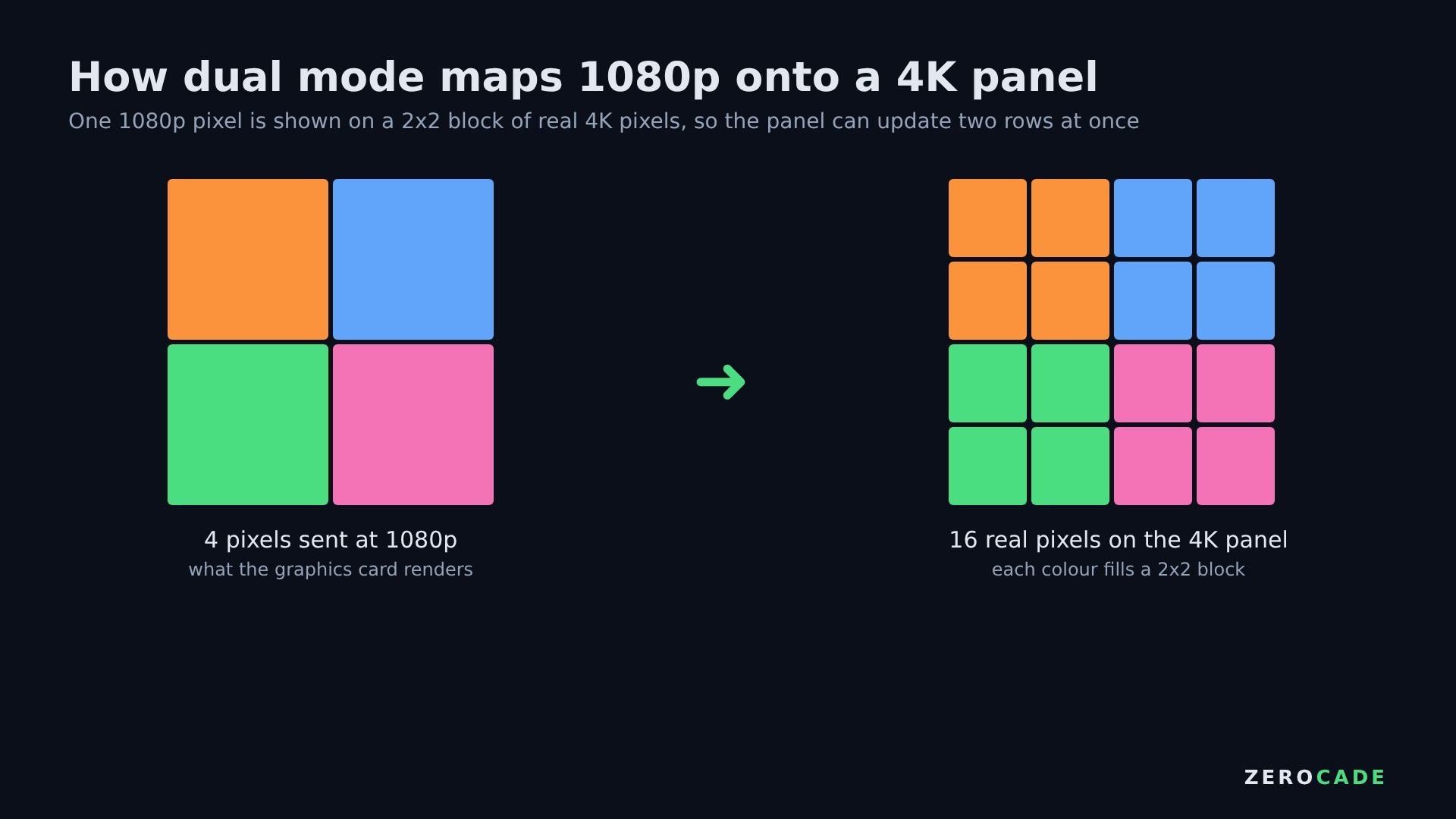
Image: Zerocade
Because 1080p is exactly half of 4K in each direction, one 1080p pixel maps perfectly onto a 2x2 block of four real 4K pixels. There's no awkward stretching or blur from uneven scaling, as you'd get running 1440p on a 4K screen.
Monitor makers don't publish every detail, but the common explanation is that in the fast mode the panel updates two rows at a time. It now only has to work through 1,080 "rows" per refresh instead of 2,160, so it can refresh roughly twice as often. The graphics card, meanwhile, only renders and sends a 1080p image.
You switch modes on the monitor itself, usually through its settings menu. Your PC then sees a 1080p, 360Hz display.
What you give up
Sharpness. On a 27-inch screen, 4K works out to about 163 pixels per inch. At 1080p, it's about 82. Text and fine detail in the fast mode look like an ordinary 1080p monitor of the same size, which most people find soft at 27 inches. On a 32-inch dual-mode monitor, it drops to about 69.
You also need a GPU that can actually reach those frame rates. 360fps is realistic mainly in lighter esports games like Valorant or Counter-Strike 2 at lower settings. In big single-player games, even high-end cards are nowhere near 360fps, and at 4K they're often below 180.
Other dual-mode monitors
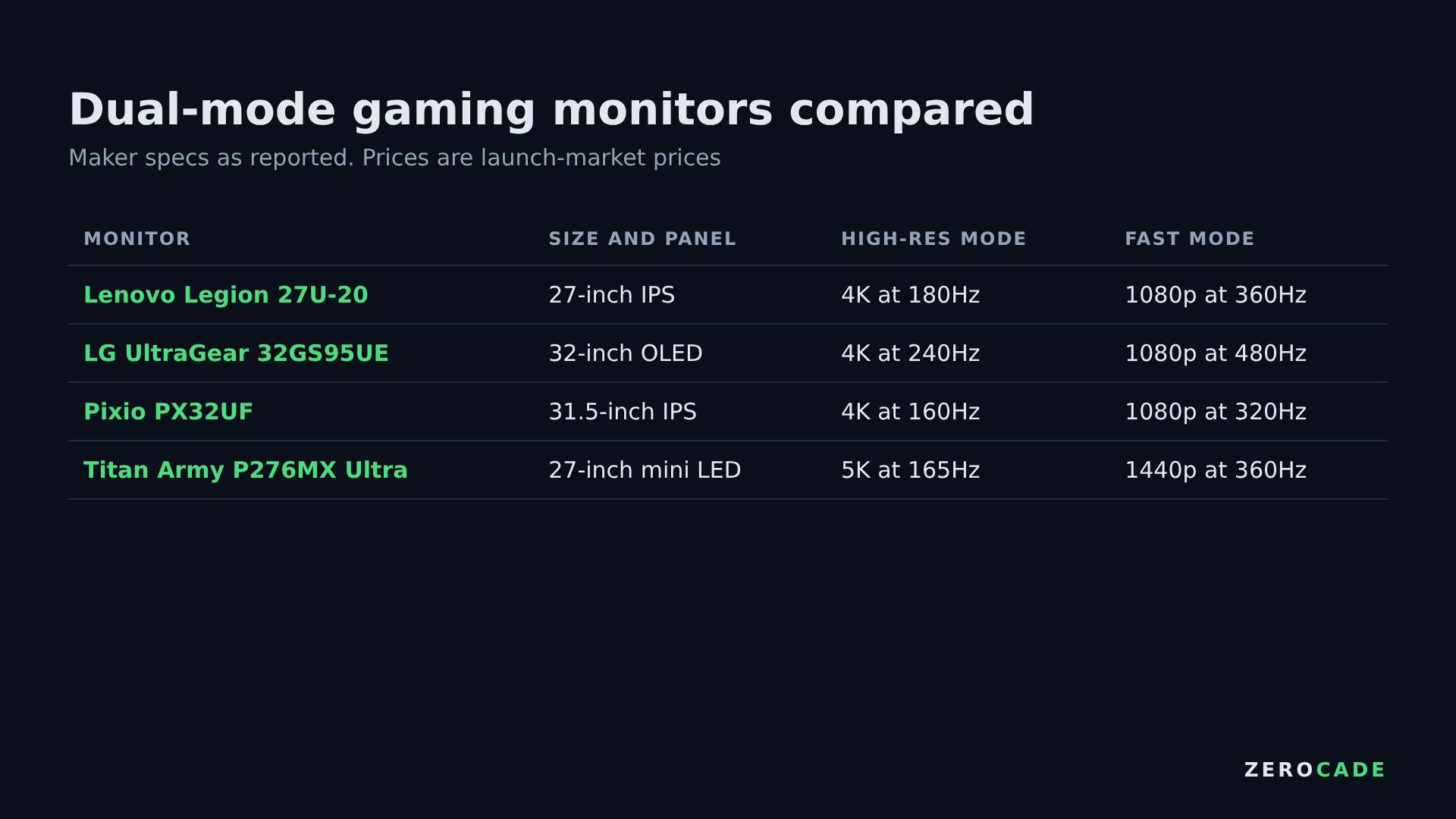
Image: Zerocade
Beyond Lenovo and LG, recent launches include Pixio's PX32UF (31.5-inch, 4K at 160Hz or 1080p at 320Hz, about ¥65,000 in Japan) and Titan Army's P276MX Ultra, a 27-inch 5K mini LED that runs 165Hz at 5K or 360Hz at 1440p.
Who should consider one?
On paper, a dual-mode monitor suits someone who plays both kinds of game: slow, pretty single-player titles in 4K, and a competitive shooter where frame rate matters more than detail. If you only play esports titles, a native 1080p or 1440p high-refresh monitor costs less. If you never go past 120fps, the dual-mode feature adds nothing.
When the 27U-20 lands in India, check whether its listing says "dual mode" and which ports support the 360Hz mode. That's usually DisplayPort, so make sure your GPU has a free one.